One property, many listings: how to appear in every Airbnb search, from couples to full-house groups
You are missing dozens of Airbnb searches every day because your listing size does not match what people are looking for.
- 1

Import your property
Paste your Airbnb link, free, no card, and we pull in your property.
- 2
Duplicate into configurations
Duplicate your listing into the room and multi-room combos on Airbnb that put you in more searches, then add each new listing's link here.
- 3onecalendar
Sync every calendar
Copy each calendar link in and out so every configuration stays blocked against the others, automatically.
Yes, Airbnb allows it
Airbnb says so directly: its Help Center describes listing "multiple rooms at one location by creating a separate listing for each space you have available," each with its own calendar and page. A room, a two-room combination, and the whole house are different spaces, so each can be its own listing.
The one thing not allowed is posting the identical space twice just to appear more often. Every listing has to describe a genuinely different bookable unit, room combinations and the full house qualify, two copies of the same room do not.
Why more listings win more searches
Airbnb search starts from the guest count a traveler types in, and it filters hard in one direction: a room listed for 2 guests never appears in a search for 6. One listing means one guest count sees you.
The other direction is about price, not visibility. A whole-house listing can still appear when a couple searches, but at the whole-house price, and Airbnb ranks listings priced above comparable results lower. A sleeps-8 house at the 8-guest price loses that 2-guest search to every right-sized room around it.
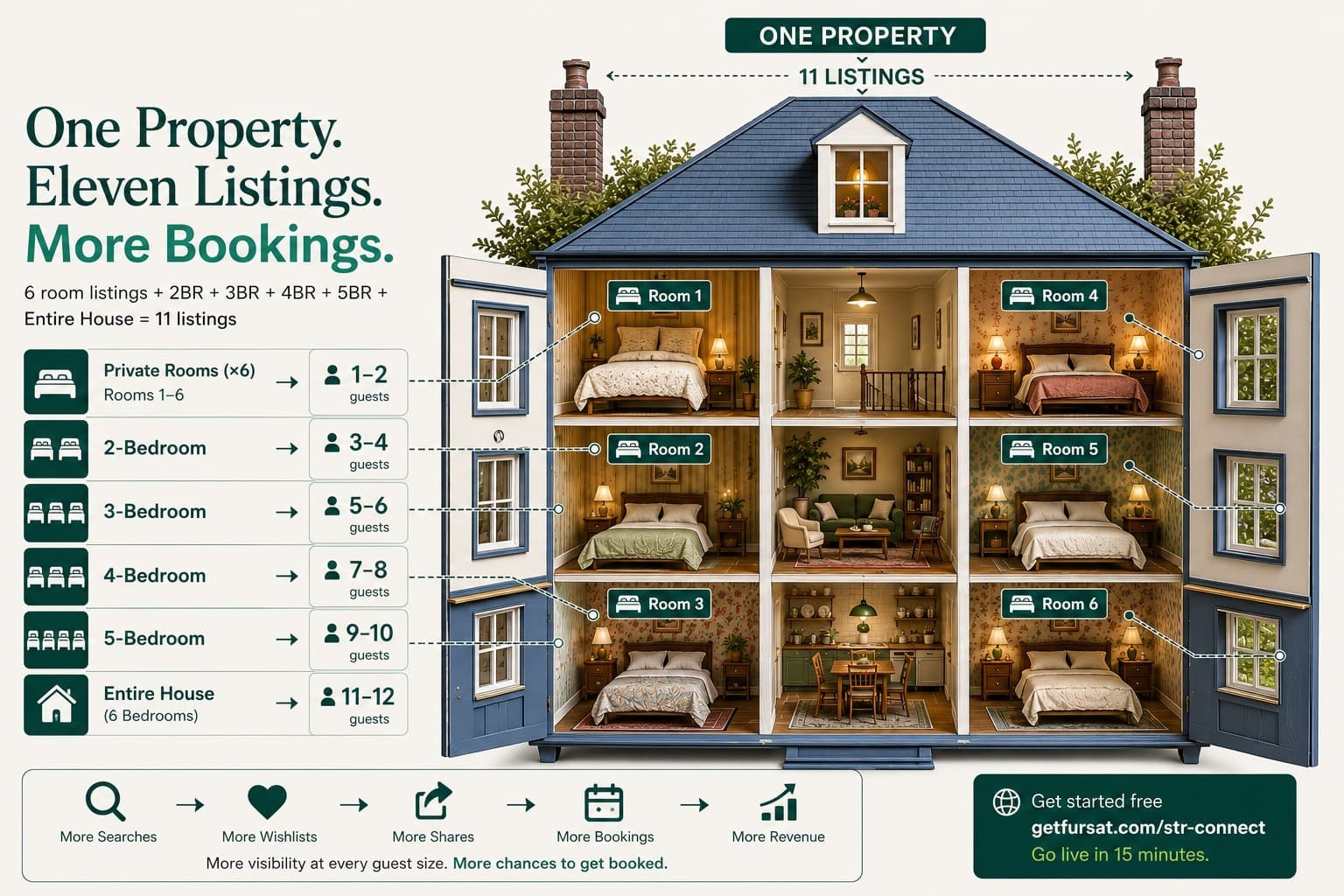
A 4-room property covers every search with up to 15 possible listings: 4 single rooms, 6 two-room pairs, 4 three-room sets, and the whole house. Most hosts start smaller, one listing per size tier is enough to put the same rooms in front of couples, families, and full groups instead of just one of them.
Pricing the combinations
Price linearly from your per-room cost. One real example: a 4-room property costing the owner ₹2,500 per room per night, priced at cost plus 50%, lists at ₹3,750 for one room, ₹7,500 for two, ₹11,250 for three, and ₹15,000 for the whole house.
Linear pricing keeps every listing honest against the others. A guest booking two rooms pays exactly twice the one-room rate, so no listing undercuts a sibling and no group has a reason to game the smaller one.
The calendar problem, and the fix
Every one of these listings sells the same physical rooms, so one booking has to instantly block every other listing sharing that room. Airbnb's own "linked calendars" feature only covers part of this: it links one entire-place listing to the rooms inside it, works only within Airbnb, and hosts report a booking on one room blocks the whole house but not the overlapping listings beside it.
Combination listings are exactly where that model breaks, two combos can share a room without either being the parent of the other. getfursat's containment engine handles the full overlap map instead: book any listing, and every listing sharing those rooms closes for the same nights, then reopens if it's cancelled. Free to connect, and it works across platforms, not just inside Airbnb.
First two calendars are free for your first property. Begin here and go live in 15 minutes.
Does Airbnb allow multiple listings for one property?
Yes. What it doesn't provide is a way to keep those listings' calendars synced against each other, that's the part getfursat handles.
Will I get double bookings if the same rooms are on several listings?
Only if you sync them by hand. getfursat closes every listing that shares a room the moment one of them is booked, and reopens them if it is cancelled.
Do I have to change or delete my existing Airbnb listing?
No. Connect free and the extra listings get added alongside it, unchanged.
How should I price the room combinations?
Cost plus a fixed margin, scaling linearly with room count, the diagram above shows a real 4-room example.
Does this cost anything?
No card, no subscription, no app to install. Live in 15 minutes. Free calendar sync covers up to 2 listings per property.